BOWHOLD
This is a real report on one of our own games, exactly as a buyer sees it. Yours shows the same sections for your game.
Overall
Fix 5 things before you submit
Ready = nothing found that the portal would refuse or flag. Fix first = problems that will likely fail review or hurt your numbers. Not open to you = the portal picks games by invitation; see how to get noticed.
QA review
Our QA team's review of the pictures from your run: what a portal's tester is likely to notice, with advice. It is guidance, not a portal's decision.
BOWHOLD has a coherent low-poly look, a clear hero and a first-frame objective with a pointer and hand. The first minute shows a modest payoff (2 kills), but the camera swings around, the hint is cut down to a single line, and the phone version is slow to draw and respond and shows no touch cues.
What our QA team noticed
- Fix first
The hand and arrow appear only in the first screen; later desktop shots and the phone have just a text line 'Pull back, release' with no gesture visual.
Advice: Show an animated drag-and-release hand on the phone and keep it until the first shot is fired.
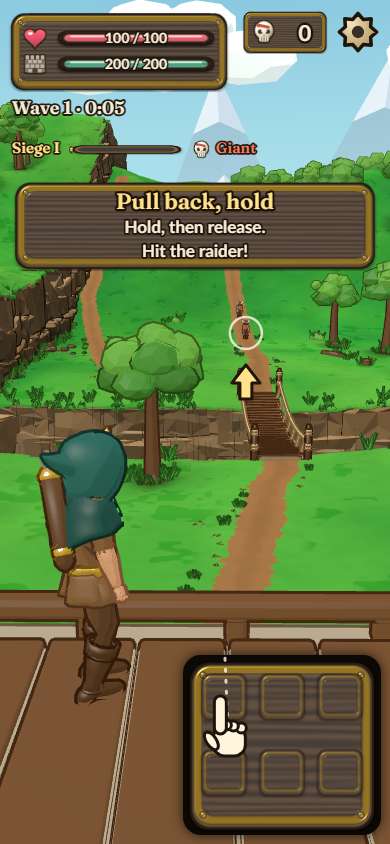 Phone
- Fix first
In the picture 30 seconds in the raiders are tiny, the camera looks at the ground, and the target and danger are hard to name quickly.
Advice: Keep the camera steady on the approach path and make the raiders larger or outlined.
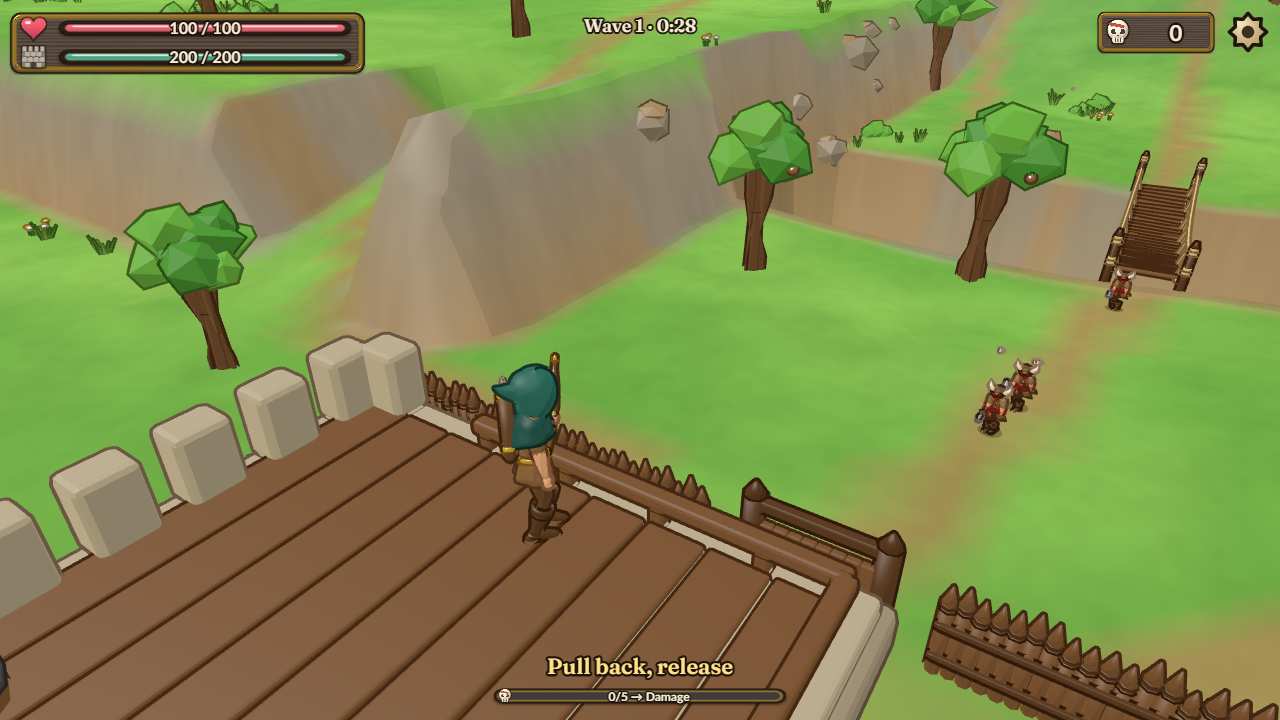 Desktop, 30 s in
- Fix first
The wall bar 200/200 sits next to health, but nothing says what raiders do or how the run ends before they arrive.
Advice: Add a short marker such as 'Protect the gate' and flash the wall bar when raiders reach it.
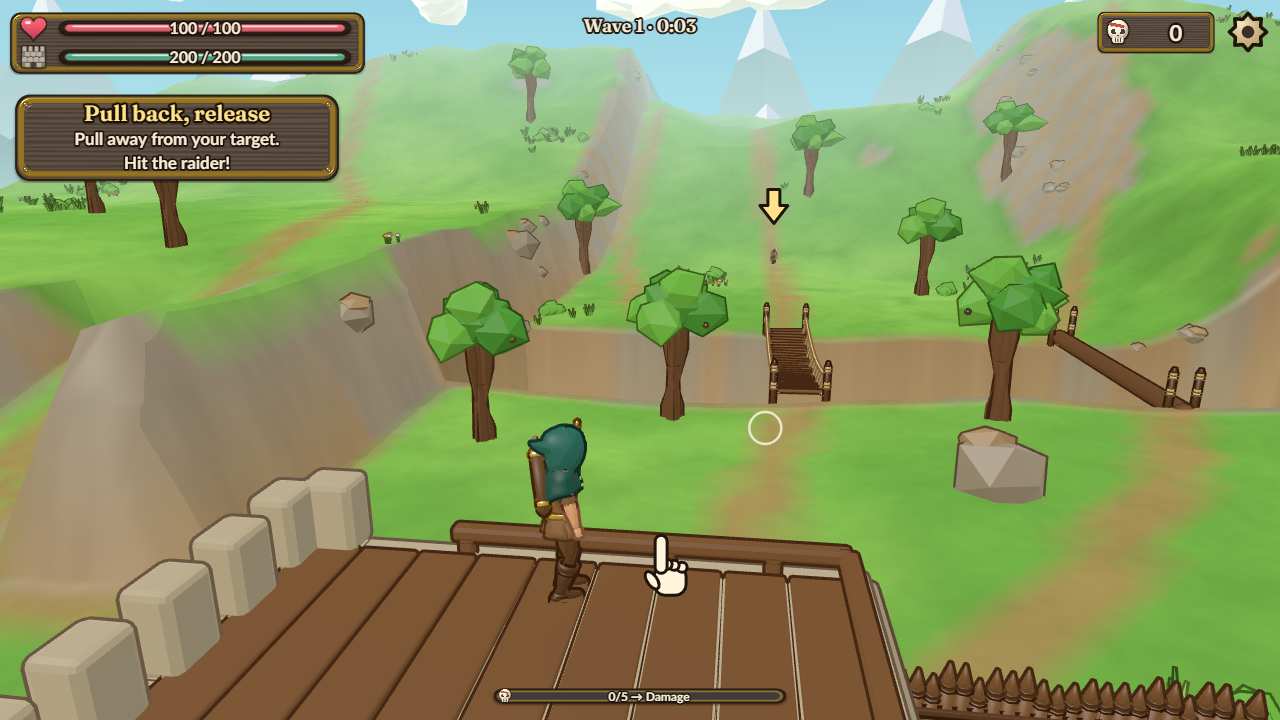 First screen
- Fix first
The desktop shot at 10 s shows an empty field with no enemies, and the measured input response took 11 s on desktop and 18 s on phone.
Advice: Respond to the first click immediately and send the first raider sooner.
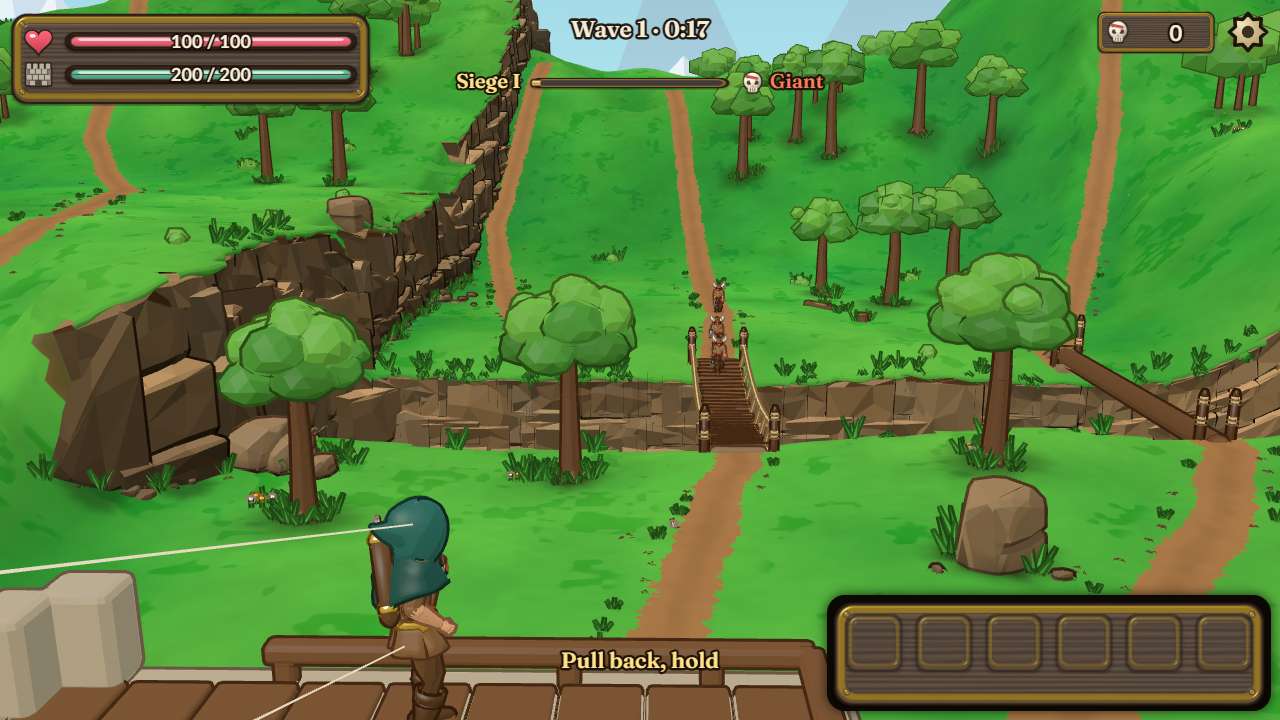 Desktop, first inputs
- Worth fixing
The HUD shows 'Bash 133' next to the wall bar with no explanation.
Advice: Replace it with a clear icon or a plain word with a short effect.
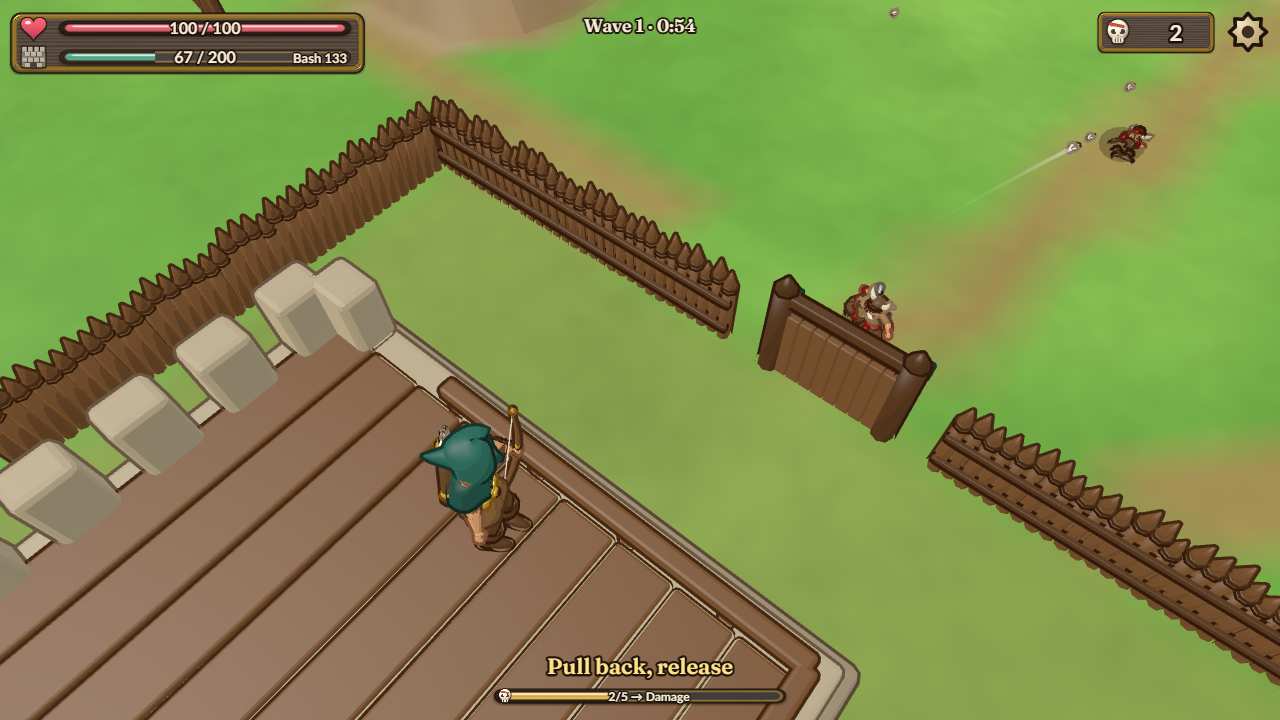 Desktop, near the end
- Worth fixing
The first screen card has two sentence lines in small text beneath its title.
Advice: Cut the card to the title, with the hand and arrow carrying the rest.
First screen - Worth fixing
The shot arrow trail in the late picture is faint and no impact burst or damage number is visible where raiders are hit.
Advice: Add a hit flash and a popping number at the impact point.
Desktop, near the end - Worth fixing
The 'Pull back, release' text remains in the 54 s shot after two kills.
Advice: Fade the hint once the player has fired a few successful shots.
Desktop, near the end
CrazyGames
Fix first1 to fix first · 7 worth fixing
- Fix first
Nothing happens when the player clicks in the first 10 seconds
The picture first changed in response to a click or key press after 43 s. Portals want players in the game at once: CrazyGames allows at most one click before play.
Fix: Land new players straight in play, or on one obvious Play button in the middle of the screen. Show the controls inside the game, not on a separate screen.
Desktop
7 worth fixing
- Worth fixing
Connects to outside servers
During play the game tried to reach: rec.whalewars.space.
Fix: Ship everything the game needs inside the build. If it is a multiplayer server, keep the game playable when the server is out of reach, and get written approval from Poki (and Playgama) for the address before you submit; on freeplays.site declare it as a game server.
- Worth fixing
Slow to load on a desktop
On a good desktop connection the game took 13 s to be ready to play. CrazyGames asks for under 20 s; Poki says players leave after 10 s.
Fix: Show something playable sooner: shrink the first download, start the game before every asset is loaded, and avoid long set-up work on the first frame.
Desktop - Worth fixing
Saves use the browser's local storage
The game saves with localStorage. Playgama requires saving through its Bridge storage; CrazyGames recommends its SDK data module (local storage is lost when players switch devices and shows a warning in its QA tool); Poki asks that local storage calls are wrapped in try/catch.
Fix: Put saving behind one small function. In each portal build, point it at that portal's storage (CrazyGames SDK data, Playgama Bridge storage) and keep localStorage, inside try/catch, only as a fallback.
- Worth fixing
Could not confirm that taps work on a phone
The game listens for touch, but in 30 seconds on a phone-sized screen our taps and swipes (centre, the game area, four swipe directions) made no visible change, although it reacts to the mouse and keyboard on desktop. It may need a specific gesture or spot on screen.
Fix: Check on a real phone that the first screen answers a plain tap, and that every action done with keys has an on-screen control. Handle pointer events (pointerdown / pointerup) so mouse and touch share one code path.
Phone - Worth fixing
The game freezes
The game froze for up to 3.4 s at a time on a desktop.
Fix: Split long work (level generation, asset decoding) into smaller steps or move it to a worker.
Desktop - Worth fixing
CrazyGames gameplay start not reported
The game never told the CrazyGames SDK that play started during the run.
Fix: Call SDK.game.gameplayStart() when play begins and gameplayStop() on pauses, menus and game over.
Playgama
Fix first1 blocks submission · 4 to fix first · 5 worth fixing
- Blocks submission
No Playgama Bridge
The build does not include the Playgama Bridge SDK, which Playgama requires.
Fix: Add playgama-bridge.js as the first script in the head (not async) with playgama-bridge-config.json next to index.html; call bridge.initialize() before loading the game, send platform.sendMessage("game_ready") on the first playable frame, and call advertisement.showInterstitial() at natural pauses.
- Fix first Nothing happens when the player clicks in the first 10 seconds (see above)
- Fix first Connects to outside servers (see above)
- Fix first Sound keeps playing when the tab is hidden (see above)
- Fix first Saves use the browser's local storage (see above)
5 worth fixing
- Worth fixing Slow to load on a desktop (see above)
- Worth fixing Could not confirm that taps work on a phone (see above)
- Worth fixing The game freezes (see above)
- Worth fixing
Sound is generated in code
Some sounds are generated in code (oscillator tones) instead of played from audio files. Playgama does not accept sound synthesized in code.
Fix: Use recorded or produced sound files (ogg or mp3) for music and effects.
- Worth fixing
Uses the Esc key
The game listens for the Esc key, which browsers use to leave fullscreen.
Fix: Use P or another key for pause, and keep Esc free.
PokiNot open to youpicks games by invitation · open for how to get noticed
Poki hand-picks every game, and its developer tools are in a closed beta: there is no review queue you can enter. You can share your game with Poki and they decide whether it is a match. Our verdict for Poki says whether the game would be ready if Poki says yes.
How to get noticed: Share a playable link (no sign-in) through Poki's 'Share your game' form with three screenshots and why it fits Poki. Make it work held upright, keep the first download small, load fast, and avoid clones of existing hits. Silence is a normal answer.
If Poki says yes: 1 blocks submission · 4 to fix first · 5 worth fixing. Most are the same as above; the rest are its own SDK and rules.
- Blocks submission
No Poki SDK
The build does not include the Poki SDK, which every Poki game needs.
Fix: Add https://game-cdn.poki.com/scripts/v2/poki-sdk.js to the Poki build; call PokiSDK.init(), gameLoadingFinished() when loading ends, gameplayStart()/gameplayStop() around play, and commercialBreak() before each gameplayStart().
- Fix first
Another portal's code is in the build
The build carries code or branding of CrazyGames. CrazyGames does not allow cross-promotion of other platforms (it can withhold revenue), and Poki allows only its own SDK.
Fix: Make one build per portal: each with only that portal's SDK, links and branding.
- Worth fixing
Too much to download before play starts
Players download about 11 MB before the game is ready. CrazyGames takes up to 50 MB and shows games on its mobile homepage only up to 20 MB; Poki publishes no size limit, but about 5 MB is the common guide for its players; YouTube Playables (through Playgama) takes up to 30 MB.
Fix: Load only what the first screen needs, then load the rest in the background while the player plays (levels, music, extra art). Biggest files: chars.glb (2.6 MB, 3D model or data), greenfold_v2.ogg (2.3 MB, audio), world.glb (1.6 MB, 3D model or data).
freeplays.siteNot open to youpicks games by invitation · open for how to get noticed
freeplays.site is curated: games appear by our invitation only. Games that pass this check can be invited.
How to get noticed: Pass this check, then write to hello@freeplays.site with your report link.
If freeplays.site says yes: 1 to fix first · 6 worth fixing. Most are the same as above; the rest are its own SDK and rules.
- Worth fixing
No freeplays.site SDK
The build does not use the freeplays.site SDK, so it gets no cloud saves, scores, room codes or play counting there.
Fix: Optional: add /sdk/v1.js and call Freeplay.init(), then gameplayStart()/gameplayStop() around play.